



Am I using too much this week?
A remaining percentage tells only part of the story. Compare it with the time until reset to understand your current pace.
 Home
Home
A Mac app for OpenAI Codex
Compare time left with allowance remaining. Review tasks and recorded model settings from the periods with the largest drops.
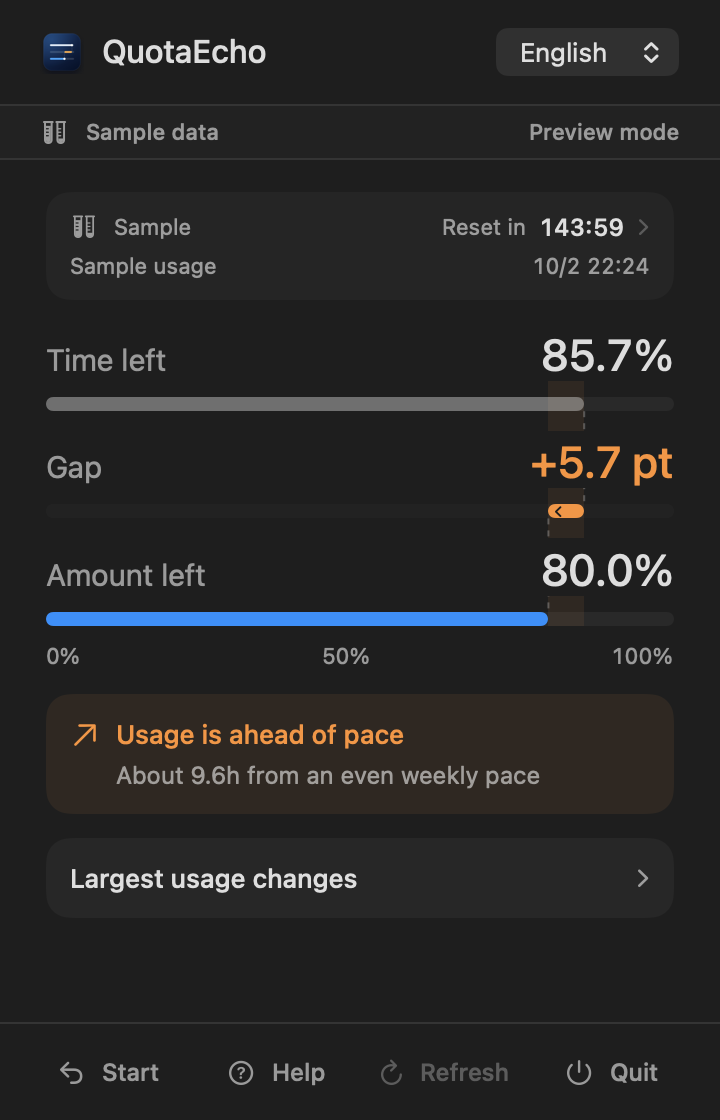
Sometimes you need to pace yourself. Sometimes you have room to explore. See your remaining allowance alongside the time and work behind it.
A remaining percentage tells only part of the story. Compare it with the time until reset to understand your current pace.
Your allowance fell faster than expected. You want to revisit the tasks, model settings, and overlapping work from that time.
The reset is close and you still have allowance left. It could be a chance to try something new or go deeper on your work.
QuotaEcho brings the information for your next decision into your Mac menu bar.
From your allowance back to your work.
For example, with 26.5% of your weekly allowance and 14.3% of the time remaining, Gap is minus 12.2 percentage points. You have headroom relative to an evenly spread usage pace.
Time and allowance, on one shared scale. Their difference shows whether usage is ahead of an even pace or you have headroom.
Choose a period with a large drop to see the tasks active at the time and their recorded model and reasoning settings. These are clues to revisit your work, not per-task consumption figures.
See up to five periods with the largest usage changes over the last 7 days (168 hours). Pick one to review its tasks and model settings, then open a task in Codex.
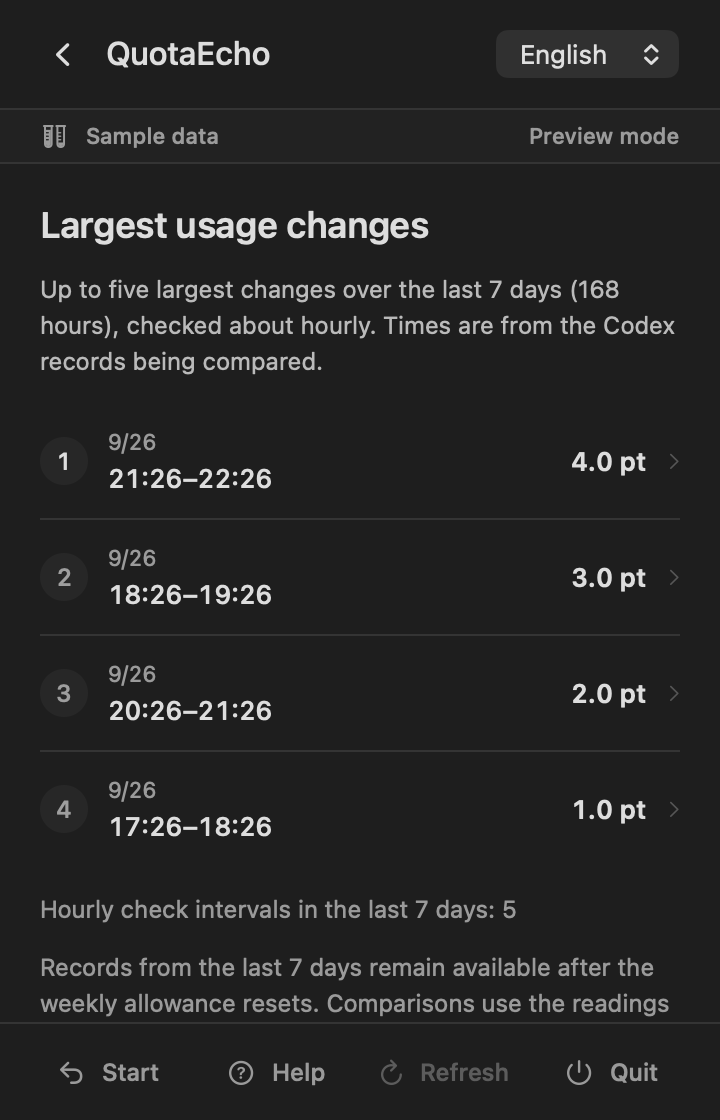
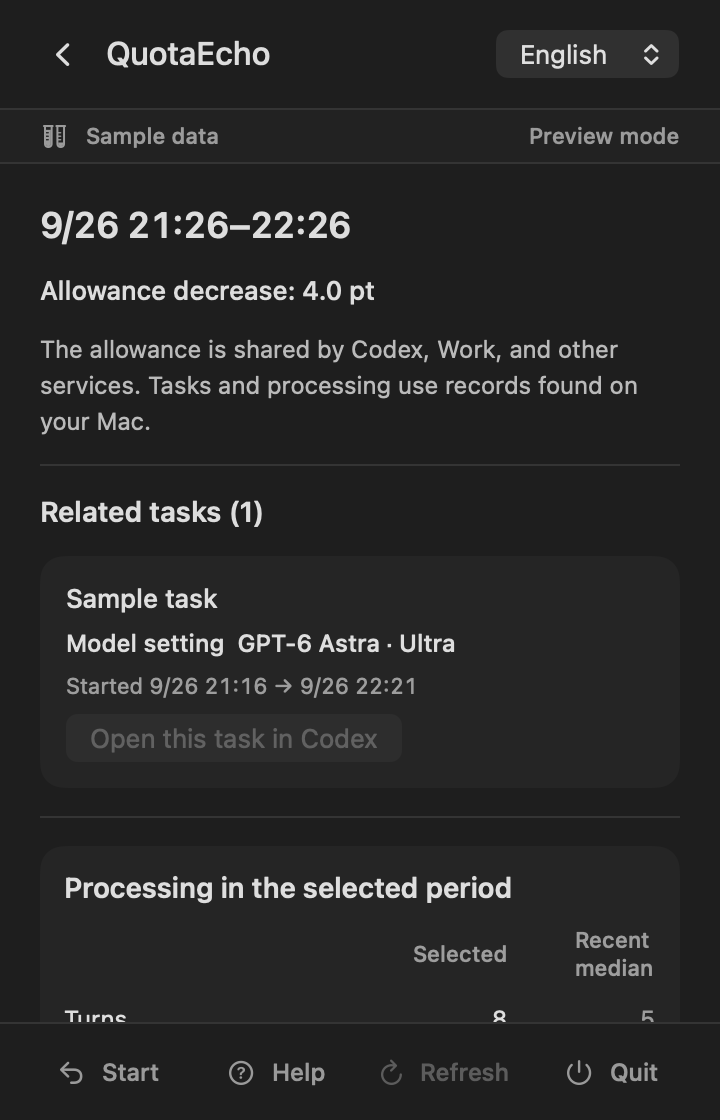
Codex, Work and other supported services share the allowance. QuotaEcho displays usage recorded by Codex on your Mac, alongside tasks and processing activity available on that same Mac. Use them to review changes alongside the work happening at the time. They do not establish per-task consumption or the cause of a change.
Your current Gap appears in the menu bar when QuotaEcho is running. Click it to see your remaining allowance or explore a period in more detail.
Choose either appearance in Help, independently of macOS. Your choice stays with you after relaunch. You can also turn button and refresh sounds on or off.

Allow read access once. QuotaEcho updates its display as Codex saves new usage records. There is no QuotaEcho account to create.
You do not enter an OpenAI ID, password, or API key into QuotaEcho.
QuotaEcho reads permitted local Codex records. It does not change Codex tasks or records.
Weekly allowance, task names, processing times, and needed counts are processed in the app.
The app does not send the information it reads to Universion Closure Logic.
Last updated: October 7, 2026
This policy describes how Universion Closure Logic, K.K. (“we,” “us,” or “the Company”) handles information in the macOS app QuotaEcho.
After you grant read-only access in macOS, QuotaEcho extracts metadata from Codex records, including the weekly allowance, available credit balances, task names, processing times and counts, and recorded model and reasoning settings. This information is processed on your Mac and is not transmitted to us by the app.
QuotaEcho does not obtain your OpenAI account ID, password, API key, cookies, authentication tokens, or auth.json. It does not extract, store, display, or transmit prompts, response bodies, reasoning, code, file paths, commands, or command output.
QuotaEcho stores the current weekly allowance and the usage history needed to compare the last 7 days, language, appearance and sound preferences, read-only permission information, a local matching value used to renew that permission safely for the same records folder, and a randomly generated local identifier inside the app sandbox. Task names, model settings and processing summaries are used in memory only while displayed and are not retained in the usage history.
In version 1.1 and later, after the weekly allowance is exhausted, the app stores the first confirmed credit balance and its timestamp, the latest balance and timestamp, and the associated weekly allowance window to display the net balance change.
History needed to review the last 7 days is kept after the weekly allowance resets. Records from past weekly windows that are no longer part of that comparison are pruned at startup and while the app runs. The last confirmed allowance record is kept until a valid new weekly allowance is obtained. You can remove QuotaEcho’s saved history, settings and read permission through the uninstall instructions in Help. Codex tasks and records are kept.
The starting credit balance is retained across app restarts. When a new weekly window with remaining allowance is confirmed, the previous credit record is cleared. If the new window is also exhausted, it is replaced with a record for that window. Stored data is retained while updated records are unavailable. Credit tracking can be deleted with other app data through the uninstall guidance in Help.
If you contact support by email, we receive your email address and message content and use them to respond and resolve the issue. Support communications may be processed by our email service provider.
The code for this website does not use advertising or behavioral-tracking cookies or analytics tools. Our hosting provider may temporarily process server logs such as IP address, browser information, and access time for security and reliable operation.
QuotaEcho is provided independently from OpenAI. It does not imply affiliation, sponsorship, endorsement, provision, or warranty by OpenAI. OpenAI’s own service information and terms govern actual availability, allowance, and account conditions.
We may update this policy when the app, law, or method of delivery changes. Material changes will be described on this page.
Universion Closure Logic, K.K.
support.quotaecho@universion-closure-logic.com

QuotaEcho is designed and developed by Universion Closure Logic, K.K. We turn Codex usage records into a clear view, so people can choose a pace that works for them.
If QuotaEcho asks for read access, follow the on-screen instructions. Once access is allowed, usage updates as Codex saves new records while you work. You can also click Refresh to check now.
If the issue remains, contact QuotaEcho Support.
support.quotaecho@universion-closure-logic.comInformation that helps us review the issue
Do not send passwords, API keys, auth.json, Codex data folders or session files, prompts, or response contents.